> ## Documentation Index
> Fetch the complete documentation index at: https://forge-64364c0e.mintlify.site/llms.txt
> Use this file to discover all available pages before exploring further.
# DataStudio
> Explore and prepare datasets from local files or HuggingFace — JSON, JSONL, CSV, and Parquet
# DataStudio (10)
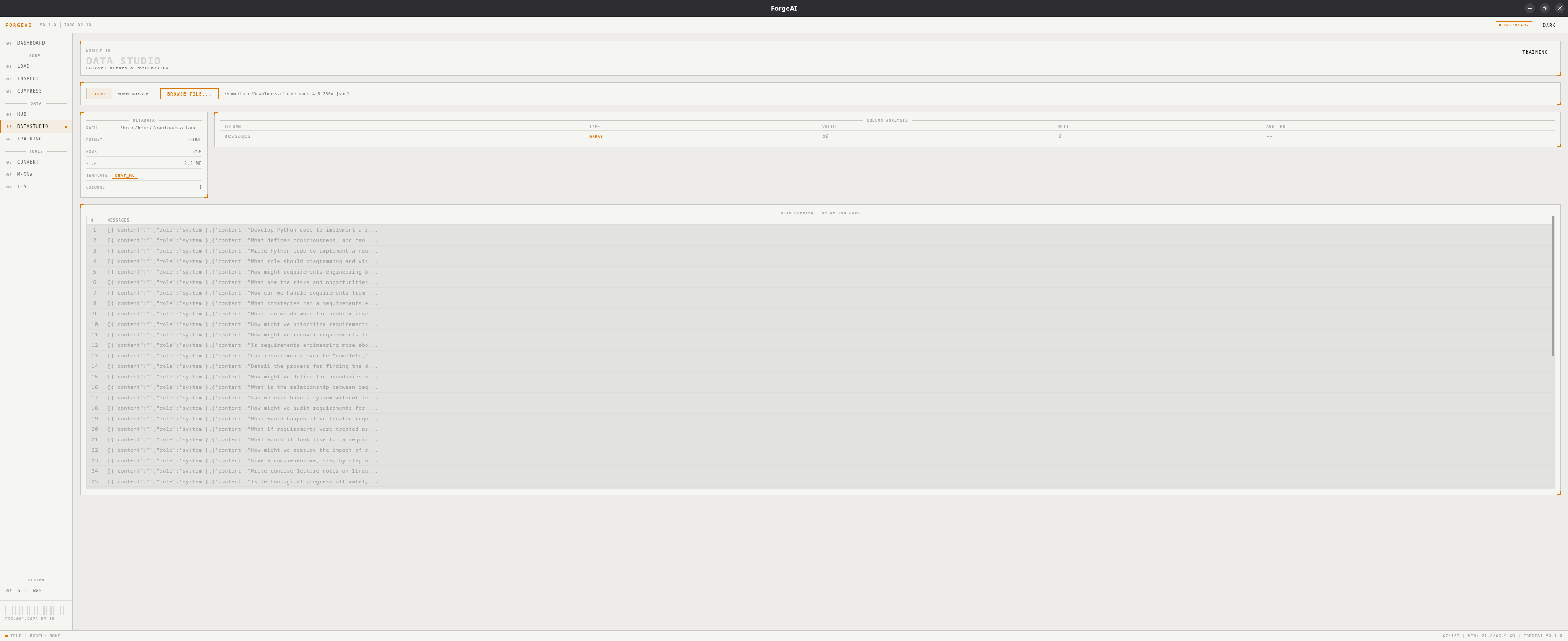
DataStudio is ForgeAI's dataset explorer. Load datasets from local files or HuggingFace, analyze column structure, detect templates, and preview data — all powered by native Rust parsing (including Parquet via Apache Arrow).
 ## Source Modes
DataStudio has two source modes, toggled via the source bar:
Browse and load dataset files from your local disk.
1. Click **BROWSE FILE**
2. Select a JSON, JSONL, CSV, or Parquet file
3. Dataset loads automatically with metadata, column analysis, and data preview
Search and download datasets directly from HuggingFace.
1. Enter a dataset repository ID (e.g., `tatsu-lab/alpaca`)
2. Click **FETCH** to list available files
3. Each file shows: filename, format badge, file size
4. Click **DOWNLOAD** to download a file with progress tracking
5. Dataset auto-loads after download completes
## Supported Formats
| Format | Parser | Notes |
| ----------- | ---------------------- | ----------------------------------------- |
| **JSON** | Rust `serde_json` | Array of objects |
| **JSONL** | Rust `serde_json` | One JSON object per line |
| **CSV** | Rust CSV reader | Comma-separated with headers |
| **Parquet** | Apache Arrow + Parquet | Columnar binary format (most HF datasets) |
## Dataset Metadata
After loading, a metadata panel shows:
| Field | Description |
| -------- | ---------------------------------------- |
| PATH | Full file path |
| FORMAT | Detected format (JSON/JSONL/CSV/PARQUET) |
| ROWS | Total row count |
| SIZE | File size |
| COLUMNS | Number of columns |
| TEMPLATE | Auto-detected template (if applicable) |
## Template Detection
ForgeAI auto-detects common dataset templates:
| Template | Description | Key Columns |
| --------------------- | ------------------------------ | -------------------------- |
| **Alpaca** | Stanford Alpaca format | instruction, input, output |
| **ShareGPT** | Multi-turn conversations | conversations |
| **ChatML** | Chat markup language | messages |
| **DPO** | Direct Preference Optimization | prompt, chosen, rejected |
| **Text** | Plain text | text |
| **Prompt/Completion** | OpenAI format | prompt, completion |
## Column Analysis
Each column is analyzed and displayed:
| Metric | Description |
| -------------- | ------------------------------------------------ |
| **Name** | Column name |
| **Dtype** | Data type (STRING, INTEGER, FLOAT, OBJECT, NULL) |
| **Valid** | Count of non-null values |
| **Null** | Count of null/empty values (highlighted if > 0) |
| **Avg Length** | Average string length (for string columns) |
## Data Preview
A scrollable table showing the first rows of the dataset. Long cell values are truncated with ellipsis for readability.
## Workflow
Toggle between **LOCAL** and **HUGGINGFACE** mode
Browse a local file or fetch + download from HuggingFace
Check metadata, template detection, and column analysis
The dataset path can be used directly in the **Training** module
## Source Modes
DataStudio has two source modes, toggled via the source bar:
Browse and load dataset files from your local disk.
1. Click **BROWSE FILE**
2. Select a JSON, JSONL, CSV, or Parquet file
3. Dataset loads automatically with metadata, column analysis, and data preview
Search and download datasets directly from HuggingFace.
1. Enter a dataset repository ID (e.g., `tatsu-lab/alpaca`)
2. Click **FETCH** to list available files
3. Each file shows: filename, format badge, file size
4. Click **DOWNLOAD** to download a file with progress tracking
5. Dataset auto-loads after download completes
## Supported Formats
| Format | Parser | Notes |
| ----------- | ---------------------- | ----------------------------------------- |
| **JSON** | Rust `serde_json` | Array of objects |
| **JSONL** | Rust `serde_json` | One JSON object per line |
| **CSV** | Rust CSV reader | Comma-separated with headers |
| **Parquet** | Apache Arrow + Parquet | Columnar binary format (most HF datasets) |
## Dataset Metadata
After loading, a metadata panel shows:
| Field | Description |
| -------- | ---------------------------------------- |
| PATH | Full file path |
| FORMAT | Detected format (JSON/JSONL/CSV/PARQUET) |
| ROWS | Total row count |
| SIZE | File size |
| COLUMNS | Number of columns |
| TEMPLATE | Auto-detected template (if applicable) |
## Template Detection
ForgeAI auto-detects common dataset templates:
| Template | Description | Key Columns |
| --------------------- | ------------------------------ | -------------------------- |
| **Alpaca** | Stanford Alpaca format | instruction, input, output |
| **ShareGPT** | Multi-turn conversations | conversations |
| **ChatML** | Chat markup language | messages |
| **DPO** | Direct Preference Optimization | prompt, chosen, rejected |
| **Text** | Plain text | text |
| **Prompt/Completion** | OpenAI format | prompt, completion |
## Column Analysis
Each column is analyzed and displayed:
| Metric | Description |
| -------------- | ------------------------------------------------ |
| **Name** | Column name |
| **Dtype** | Data type (STRING, INTEGER, FLOAT, OBJECT, NULL) |
| **Valid** | Count of non-null values |
| **Null** | Count of null/empty values (highlighted if > 0) |
| **Avg Length** | Average string length (for string columns) |
## Data Preview
A scrollable table showing the first rows of the dataset. Long cell values are truncated with ellipsis for readability.
## Workflow
Toggle between **LOCAL** and **HUGGINGFACE** mode
Browse a local file or fetch + download from HuggingFace
Check metadata, template detection, and column analysis
The dataset path can be used directly in the **Training** module