> ## Documentation Index
> Fetch the complete documentation index at: https://forge-64364c0e.mintlify.site/llms.txt
> Use this file to discover all available pages before exploring further.
# M-DNA Forge
> Merge 2–5 parent models into hybrid offspring using 12 methods with 3D visualization and presets
# M-DNA Forge (08)
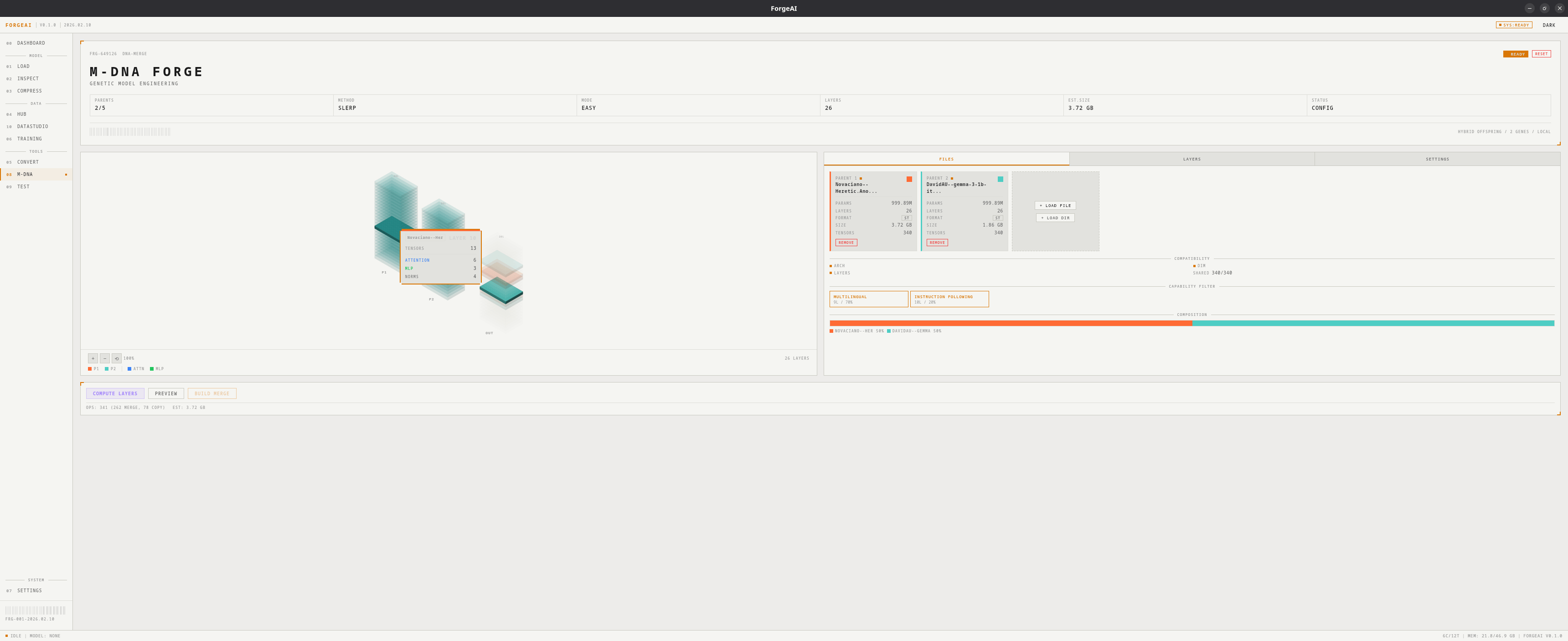
M-DNA Forge is ForgeAI's model merging system. Load multiple parent models, choose a merge strategy, configure layer assignments, and build a hybrid offspring — with 12 merge methods, 5 quick presets, and an interactive 3D visualization.
 ## Concepts
| Term | Meaning |
| -------------------- | ------------------------------------------------------------------------------- |
| **Parent** | A source model contributing weights (2–5 supported) |
| **Offspring** | The resulting merged model |
| **Base model** | A reference model required by some methods (TIES, DARE, Task Arithmetic, DeLLa) |
| **Layer assignment** | Which parent provides which layer in the offspring |
## 12 Merge Methods
| Method | Difficulty | Requires Base | Description |
| ------------------- | :----------: | :-----------: | ------------------------------------------------- |
| **Average** | Easy | No | Weighted mean of tensors |
| **SLERP** | Easy | No | Spherical interpolation — best for 2-model merges |
| **Passthrough** | Easy | No | Direct copy from a single parent |
| **Task Arithmetic** | Intermediate | Yes | Add task vectors from finetunes to a base |
| **Frankenmerge** | Intermediate | No | Cherry-pick layers from specific parents |
| **DARE** | Intermediate | Yes | Drop and rescale delta parameters |
| **TIES** | Intermediate | Yes | Trim, elect sign, merge — resolve interference |
| **DeLLa** | Advanced | Yes | Density-based layer-level adaptive merging |
| **Component Merge** | Advanced | No | Route attention/MLP/norm to different parents |
| **Tensor Surgery** | Advanced | No | Per-tensor source mapping from any parent |
| **Parameter Slice** | Advanced | No | Dimensional slicing across parents |
| **MoE Conversion** | Advanced | No | Convert dense models to Mixture-of-Experts |
## Quick Presets
## Concepts
| Term | Meaning |
| -------------------- | ------------------------------------------------------------------------------- |
| **Parent** | A source model contributing weights (2–5 supported) |
| **Offspring** | The resulting merged model |
| **Base model** | A reference model required by some methods (TIES, DARE, Task Arithmetic, DeLLa) |
| **Layer assignment** | Which parent provides which layer in the offspring |
## 12 Merge Methods
| Method | Difficulty | Requires Base | Description |
| ------------------- | :----------: | :-----------: | ------------------------------------------------- |
| **Average** | Easy | No | Weighted mean of tensors |
| **SLERP** | Easy | No | Spherical interpolation — best for 2-model merges |
| **Passthrough** | Easy | No | Direct copy from a single parent |
| **Task Arithmetic** | Intermediate | Yes | Add task vectors from finetunes to a base |
| **Frankenmerge** | Intermediate | No | Cherry-pick layers from specific parents |
| **DARE** | Intermediate | Yes | Drop and rescale delta parameters |
| **TIES** | Intermediate | Yes | Trim, elect sign, merge — resolve interference |
| **DeLLa** | Advanced | Yes | Density-based layer-level adaptive merging |
| **Component Merge** | Advanced | No | Route attention/MLP/norm to different parents |
| **Tensor Surgery** | Advanced | No | Per-tensor source mapping from any parent |
| **Parameter Slice** | Advanced | No | Dimensional slicing across parents |
| **MoE Conversion** | Advanced | No | Convert dense models to Mixture-of-Experts |
## Quick Presets
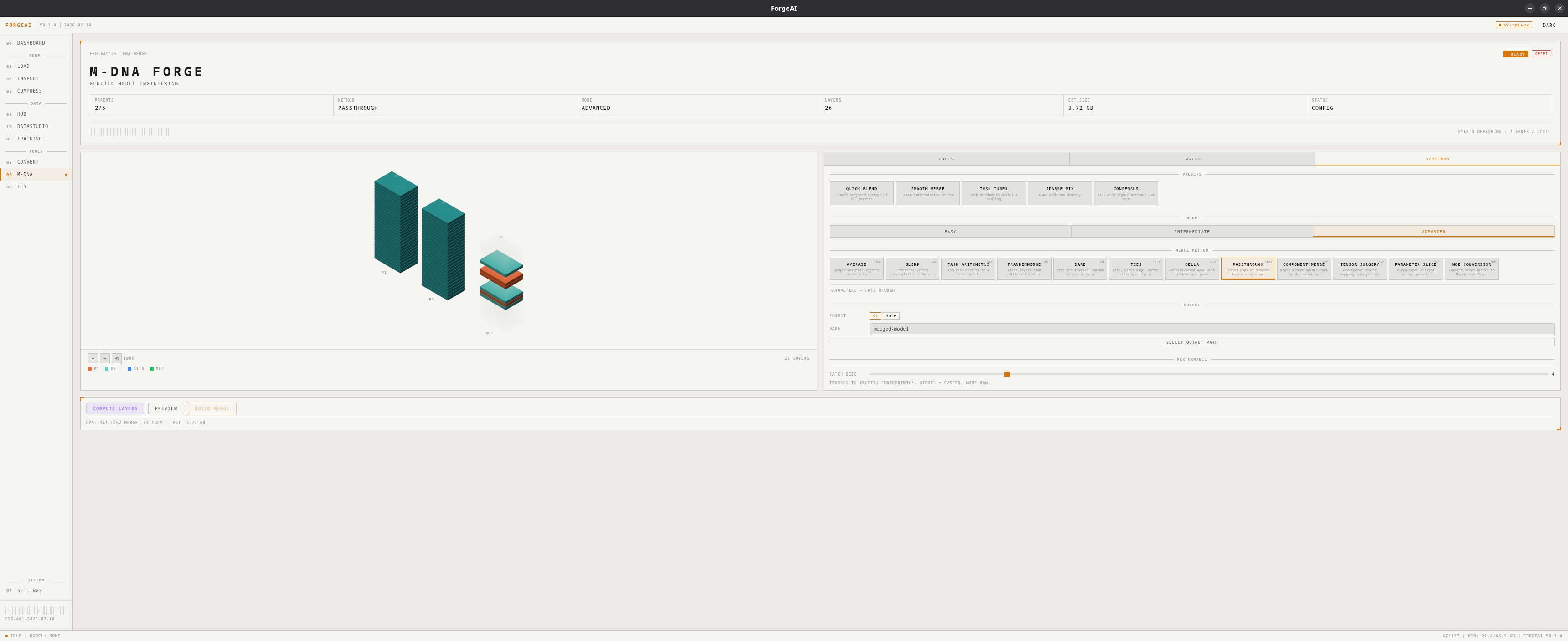 Click a preset to instantly configure method and parameters:
| Preset | Method | Key Params | Best For |
| ---------------- | --------------- | ------------- | ----------------------- |
| **Quick Blend** | Average | — | Simple, fast merging |
| **Smooth Merge** | SLERP | t = 0.5 | Balanced interpolation |
| **Task Tuner** | Task Arithmetic | scaling = 1.0 | Adding capabilities |
| **Sparse Mix** | DARE | density = 0.5 | Efficient delta merging |
| **Consensus** | TIES | trim = 0.2 | Conflict resolution |
## Difficulty Modes
| Mode | Available Methods | Best For |
| ---------------- | ------------------------------------------- | ---------------- |
| **Easy** | Average, SLERP, Passthrough | First-time users |
| **Intermediate** | + Frankenmerge, Task Arithmetic, DARE, TIES | Most merges |
| **Advanced** | All 12 methods | Expert users |
## 3D Isometric Visualization
Interactive tower view showing all parent models and the resulting offspring:
* Each layer color-coded by source parent
* Hover for detailed tooltips
* Pan, zoom, and reset controls
## Layout
Two-column layout with 3D visualization on the left and a tabbed panel on the right:
### Files Tab
* Parent model cards (name, params, layers, format, size)
* Load / remove parents
* Set base model (for methods that require one)
* Compatibility report and composition statistics
### Layers Tab
* Per-layer parent assignment (click to cycle)
* **AUTO: SPLIT** — alternating parent assignment
* **AUTO: INTERLEAVE** — equal chunk assignment
* Layer analysis — specialization badges (Syntactic / Semantic / Reasoning)
* Capability detection and filtering (7 capabilities)
### Settings Tab
* Mode selector (Easy / Intermediate / Advanced)
* Presets section with 5 quick-apply cards
* Method grid filtered by current mode
* Method-specific parameter sliders
* Output format (SafeTensors / GGUF), model name, output path
* Batch size slider (1–16 concurrent tensors)
## Performance Settings
| Setting | Range | Default | Description |
| ---------- | :---: | :-----: | ---------------------------------------------------------- |
| Batch Size | 1–16 | 1 | Tensors processed concurrently. Higher = faster, more RAM. |
## Compatibility Checking
With 2+ parents loaded, ForgeAI validates:
* Architecture match
* Hidden dimension match
* Layer count match
* Shared tensor count
## Cross-Dimension Merging
When parent models have **different hidden dimensions** (e.g., 640 vs 1152), ForgeAI can still merge them using a resolution strategy. The strategy adapts tensor shapes before the merge operation runs.
| Strategy | Quality | Description |
| ----------------- | :-----: | ----------------------------------------------------------------------------------------------------------------- |
| **Interpolation** | Medium | Resize tensors via linear/nearest-neighbor interpolation to match target shape. Default when dimensions mismatch. |
| **Zero Padding** | Medium | Pad smaller tensors with zeros to match the largest parent's shape. |
| **Truncation** | Low | Truncate larger tensors to match the smallest parent's shape. Loses data. |
| **MoE Routing** | High | Convert to Mixture-of-Experts — each parent becomes an expert, bypassing dimension issues entirely. |
When a dimension mismatch is detected, **Interpolation** is auto-selected. Click any strategy in the compatibility panel to switch.
## Output Formats
| Format | Output |
| --------------- | -------------------------------------------------------- |
| **SafeTensors** | Directory with model weights + tokenizer/config files |
| **GGUF** | Single `.gguf` file with embedded metadata and tokenizer |
## Workflow
Add 2+ models via the Files tab
Review the compatibility report
Click a quick preset, or manually select mode → method → parameters
For Frankenmerge: set layer assignments (or use AUTO SPLIT/INTERLEAVE)
Click **BUILD MERGE**, monitor progress in sidebar and status bar
Merge runs in the background — you can navigate freely while it processes. Progress is shown in the sidebar and status bar.
Click a preset to instantly configure method and parameters:
| Preset | Method | Key Params | Best For |
| ---------------- | --------------- | ------------- | ----------------------- |
| **Quick Blend** | Average | — | Simple, fast merging |
| **Smooth Merge** | SLERP | t = 0.5 | Balanced interpolation |
| **Task Tuner** | Task Arithmetic | scaling = 1.0 | Adding capabilities |
| **Sparse Mix** | DARE | density = 0.5 | Efficient delta merging |
| **Consensus** | TIES | trim = 0.2 | Conflict resolution |
## Difficulty Modes
| Mode | Available Methods | Best For |
| ---------------- | ------------------------------------------- | ---------------- |
| **Easy** | Average, SLERP, Passthrough | First-time users |
| **Intermediate** | + Frankenmerge, Task Arithmetic, DARE, TIES | Most merges |
| **Advanced** | All 12 methods | Expert users |
## 3D Isometric Visualization
Interactive tower view showing all parent models and the resulting offspring:
* Each layer color-coded by source parent
* Hover for detailed tooltips
* Pan, zoom, and reset controls
## Layout
Two-column layout with 3D visualization on the left and a tabbed panel on the right:
### Files Tab
* Parent model cards (name, params, layers, format, size)
* Load / remove parents
* Set base model (for methods that require one)
* Compatibility report and composition statistics
### Layers Tab
* Per-layer parent assignment (click to cycle)
* **AUTO: SPLIT** — alternating parent assignment
* **AUTO: INTERLEAVE** — equal chunk assignment
* Layer analysis — specialization badges (Syntactic / Semantic / Reasoning)
* Capability detection and filtering (7 capabilities)
### Settings Tab
* Mode selector (Easy / Intermediate / Advanced)
* Presets section with 5 quick-apply cards
* Method grid filtered by current mode
* Method-specific parameter sliders
* Output format (SafeTensors / GGUF), model name, output path
* Batch size slider (1–16 concurrent tensors)
## Performance Settings
| Setting | Range | Default | Description |
| ---------- | :---: | :-----: | ---------------------------------------------------------- |
| Batch Size | 1–16 | 1 | Tensors processed concurrently. Higher = faster, more RAM. |
## Compatibility Checking
With 2+ parents loaded, ForgeAI validates:
* Architecture match
* Hidden dimension match
* Layer count match
* Shared tensor count
## Cross-Dimension Merging
When parent models have **different hidden dimensions** (e.g., 640 vs 1152), ForgeAI can still merge them using a resolution strategy. The strategy adapts tensor shapes before the merge operation runs.
| Strategy | Quality | Description |
| ----------------- | :-----: | ----------------------------------------------------------------------------------------------------------------- |
| **Interpolation** | Medium | Resize tensors via linear/nearest-neighbor interpolation to match target shape. Default when dimensions mismatch. |
| **Zero Padding** | Medium | Pad smaller tensors with zeros to match the largest parent's shape. |
| **Truncation** | Low | Truncate larger tensors to match the smallest parent's shape. Loses data. |
| **MoE Routing** | High | Convert to Mixture-of-Experts — each parent becomes an expert, bypassing dimension issues entirely. |
When a dimension mismatch is detected, **Interpolation** is auto-selected. Click any strategy in the compatibility panel to switch.
## Output Formats
| Format | Output |
| --------------- | -------------------------------------------------------- |
| **SafeTensors** | Directory with model weights + tokenizer/config files |
| **GGUF** | Single `.gguf` file with embedded metadata and tokenizer |
## Workflow
Add 2+ models via the Files tab
Review the compatibility report
Click a quick preset, or manually select mode → method → parameters
For Frankenmerge: set layer assignments (or use AUTO SPLIT/INTERLEAVE)
Click **BUILD MERGE**, monitor progress in sidebar and status bar
Merge runs in the background — you can navigate freely while it processes. Progress is shown in the sidebar and status bar.