> ## Documentation Index
> Fetch the complete documentation index at: https://forge-64364c0e.mintlify.site/llms.txt
> Use this file to discover all available pages before exploring further.
# Load
> Import AI models from disk — GGUF files, SafeTensors files, or sharded model folders
# Load (01)
The Load module imports AI models into ForgeAI. It parses model headers without reading the full file, extracting metadata, tensor maps, and architecture information in under a second.
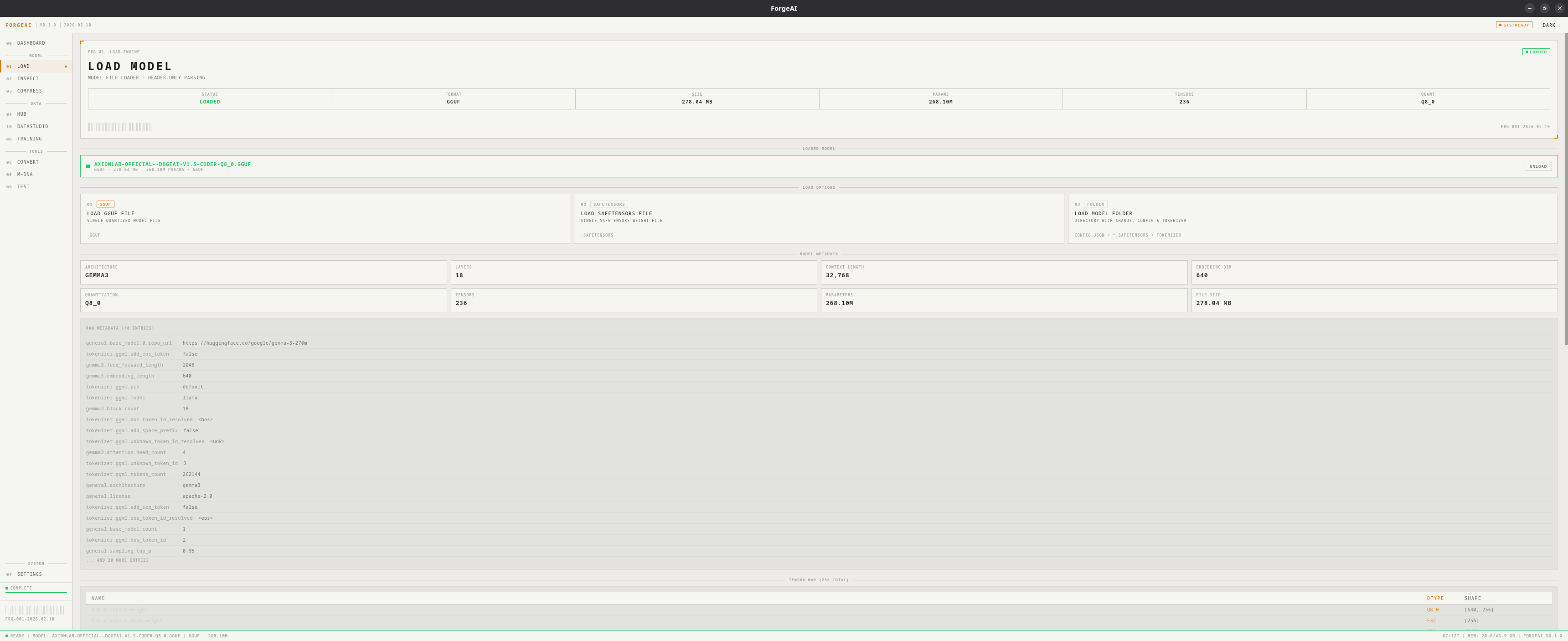 ## Load Options
Single `.gguf` file — quantized models from the llama.cpp ecosystem
Single `.safetensors` file — HuggingFace model weights
Directory with `.safetensors` + `config.json` — sharded HuggingFace models
## What Gets Parsed
On load, ForgeAI reads the model header and extracts:
* **Architecture** (e.g., LlamaForCausalLM, MistralForCausalLM, Qwen2ForCausalLM)
* **Layer count** and context length
* **Embedding dimensions**
* **Parameter count** (computed from tensor shapes)
* **Quantization type** (GGUF only)
* **Tensor map** — names, dtypes, and shapes of all tensors
* **Raw metadata** — all key-value pairs from the model header
For folder-based models, it additionally detects:
* Number of shards
* Presence of `config.json`
* Presence of tokenizer files
## Hero Panel
| Field | Values |
| ------- | ---------------------------------- |
| STATUS | IDLE, LOADING, LOADED, ERROR |
| FORMAT | GGUF or SAFETENSORS |
| SIZE | File size on disk |
| PARAMS | Parameter count (e.g., 7.24B) |
| TENSORS | Total tensor count |
| QUANT | Quantization type (e.g., Q4\_K\_M) |
## Metadata Grid
After loading, a grid displays key model properties:
| Field | Description |
| ------------ | ------------------------------------- |
| ARCHITECTURE | Model family (LlamaForCausalLM, etc.) |
| LAYERS | Number of transformer layers |
| CONTEXT | Maximum sequence length |
| EMBEDDING | Hidden dimension size |
| QUANT | Quantization type |
| TENSORS | Total tensor count |
| PARAMS | Parameter count |
| SIZE | File size on disk |
## Tensor Map Preview
A table showing tensor names, dtypes, and shapes. For large models the preview is capped with a count of remaining tensors.
## Raw Metadata
A scrollable list of the first 20 metadata key-value pairs from the model header.
## Workflow
Choose **LOAD GGUF FILE**, **LOAD SAFETENSORS FILE**, or **LOAD MODEL FOLDER**
Pick your model in the system dialog
Header parsing takes under 1 second. Review model metadata, tensor map, and raw metadata.
The model is now available in Inspect, Compress, Convert, Training, M-DNA, and Test modules. Click **UNLOAD** to clear it.
Loading only parses the header — it does not load the full model into memory, so even 70B+ models load instantly.
## Load Options
Single `.gguf` file — quantized models from the llama.cpp ecosystem
Single `.safetensors` file — HuggingFace model weights
Directory with `.safetensors` + `config.json` — sharded HuggingFace models
## What Gets Parsed
On load, ForgeAI reads the model header and extracts:
* **Architecture** (e.g., LlamaForCausalLM, MistralForCausalLM, Qwen2ForCausalLM)
* **Layer count** and context length
* **Embedding dimensions**
* **Parameter count** (computed from tensor shapes)
* **Quantization type** (GGUF only)
* **Tensor map** — names, dtypes, and shapes of all tensors
* **Raw metadata** — all key-value pairs from the model header
For folder-based models, it additionally detects:
* Number of shards
* Presence of `config.json`
* Presence of tokenizer files
## Hero Panel
| Field | Values |
| ------- | ---------------------------------- |
| STATUS | IDLE, LOADING, LOADED, ERROR |
| FORMAT | GGUF or SAFETENSORS |
| SIZE | File size on disk |
| PARAMS | Parameter count (e.g., 7.24B) |
| TENSORS | Total tensor count |
| QUANT | Quantization type (e.g., Q4\_K\_M) |
## Metadata Grid
After loading, a grid displays key model properties:
| Field | Description |
| ------------ | ------------------------------------- |
| ARCHITECTURE | Model family (LlamaForCausalLM, etc.) |
| LAYERS | Number of transformer layers |
| CONTEXT | Maximum sequence length |
| EMBEDDING | Hidden dimension size |
| QUANT | Quantization type |
| TENSORS | Total tensor count |
| PARAMS | Parameter count |
| SIZE | File size on disk |
## Tensor Map Preview
A table showing tensor names, dtypes, and shapes. For large models the preview is capped with a count of remaining tensors.
## Raw Metadata
A scrollable list of the first 20 metadata key-value pairs from the model header.
## Workflow
Choose **LOAD GGUF FILE**, **LOAD SAFETENSORS FILE**, or **LOAD MODEL FOLDER**
Pick your model in the system dialog
Header parsing takes under 1 second. Review model metadata, tensor map, and raw metadata.
The model is now available in Inspect, Compress, Convert, Training, M-DNA, and Test modules. Click **UNLOAD** to clear it.
Loading only parses the header — it does not load the full model into memory, so even 70B+ models load instantly.