> ## Documentation Index
> Fetch the complete documentation index at: https://forge-64364c0e.mintlify.site/llms.txt
> Use this file to discover all available pages before exploring further.
# Compress
> Quantize GGUF models across 7 compression levels with real-time size and quality preview
# Compress (03)
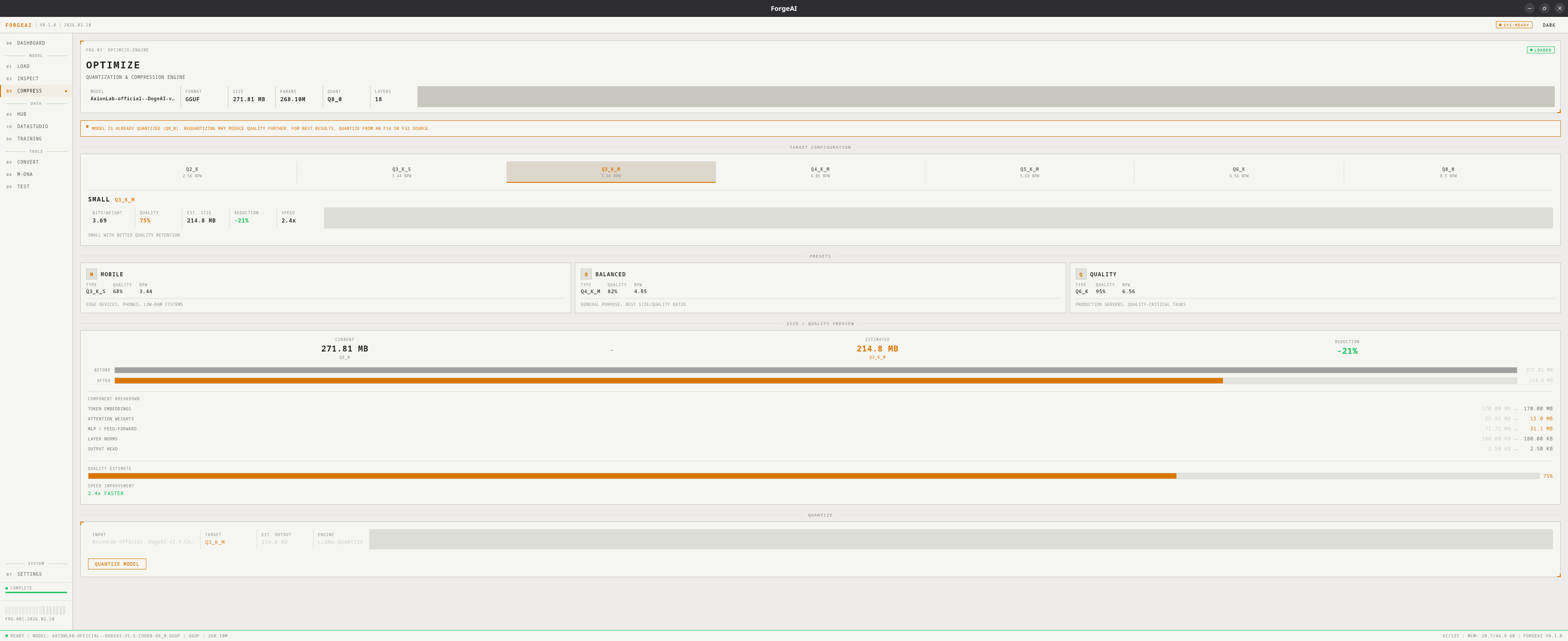
Quantize GGUF models to smaller sizes using llama-quantize. Preview estimated size, quality, and speed before running.
 Requires a loaded **GGUF** model and **llama.cpp tools** installed (see [Settings](/modules/settings)).
## Quantization Levels
| Level | Type | Bits/Weight | Quality | Use Case |
| -------- | -------- | :---------: | :-----: | ------------------------------------------- |
| EXTREME | Q2\_K | 2.63 | \~60% | Smallest possible, significant quality loss |
| TINY | Q3\_K\_S | 3.50 | \~68% | Very small, noticeable quality loss |
| SMALL | Q3\_K\_M | 3.91 | \~72% | Small with better quality |
| COMPACT | Q4\_K\_M | 4.85 | \~80% | Good balance for most use cases |
| BALANCED | Q5\_K\_M | 5.69 | \~87% | Recommended general purpose |
| HIGH | Q6\_K | 6.56 | \~93% | Near-original quality |
| ULTRA | Q8\_0 | 8.50 | \~98% | Minimal quality loss |
## Presets
**Q3\_K\_M** — Edge devices, phones, low-RAM systems
**Q5\_K\_M** — General purpose desktops and laptops
**Q8\_0** — Production servers, quality-critical applications
## Size & Quality Preview
Before quantizing, a preview shows:
* **Before/After** file sizes with reduction percentage
* **Component breakdown**: attention, MLP, embeddings, output head, norms
* **Quality estimate** bar
* **Speed improvement** relative to original
Requantizing an already-quantized model produces worse results than quantizing from a high-precision source (F16/F32).
## Workflow
Use the [Load module](/modules/load) to import a GGUF file
Click a level button or preset card
Check estimated size, quality, and speed
Click **QUANTIZE MODEL**, choose output path, monitor progress
The original model is never modified — output is always a new GGUF file.
Requires a loaded **GGUF** model and **llama.cpp tools** installed (see [Settings](/modules/settings)).
## Quantization Levels
| Level | Type | Bits/Weight | Quality | Use Case |
| -------- | -------- | :---------: | :-----: | ------------------------------------------- |
| EXTREME | Q2\_K | 2.63 | \~60% | Smallest possible, significant quality loss |
| TINY | Q3\_K\_S | 3.50 | \~68% | Very small, noticeable quality loss |
| SMALL | Q3\_K\_M | 3.91 | \~72% | Small with better quality |
| COMPACT | Q4\_K\_M | 4.85 | \~80% | Good balance for most use cases |
| BALANCED | Q5\_K\_M | 5.69 | \~87% | Recommended general purpose |
| HIGH | Q6\_K | 6.56 | \~93% | Near-original quality |
| ULTRA | Q8\_0 | 8.50 | \~98% | Minimal quality loss |
## Presets
**Q3\_K\_M** — Edge devices, phones, low-RAM systems
**Q5\_K\_M** — General purpose desktops and laptops
**Q8\_0** — Production servers, quality-critical applications
## Size & Quality Preview
Before quantizing, a preview shows:
* **Before/After** file sizes with reduction percentage
* **Component breakdown**: attention, MLP, embeddings, output head, norms
* **Quality estimate** bar
* **Speed improvement** relative to original
Requantizing an already-quantized model produces worse results than quantizing from a high-precision source (F16/F32).
## Workflow
Use the [Load module](/modules/load) to import a GGUF file
Click a level button or preset card
Check estimated size, quality, and speed
Click **QUANTIZE MODEL**, choose output path, monitor progress
The original model is never modified — output is always a new GGUF file.