> ## Documentation Index
> Fetch the complete documentation index at: https://forge-64364c0e.mintlify.site/llms.txt
> Use this file to discover all available pages before exploring further.
# Training
> Fine-tune models with LoRA, QLoRA, SFT, DPO, or Full training — plus pure-Rust layer surgery
# Training (06)
The Training module provides two modes: **Fine-Tune** for GPU-accelerated model training, and **Layer Surgery** for pure-Rust tensor operations that don't require Python or a GPU.
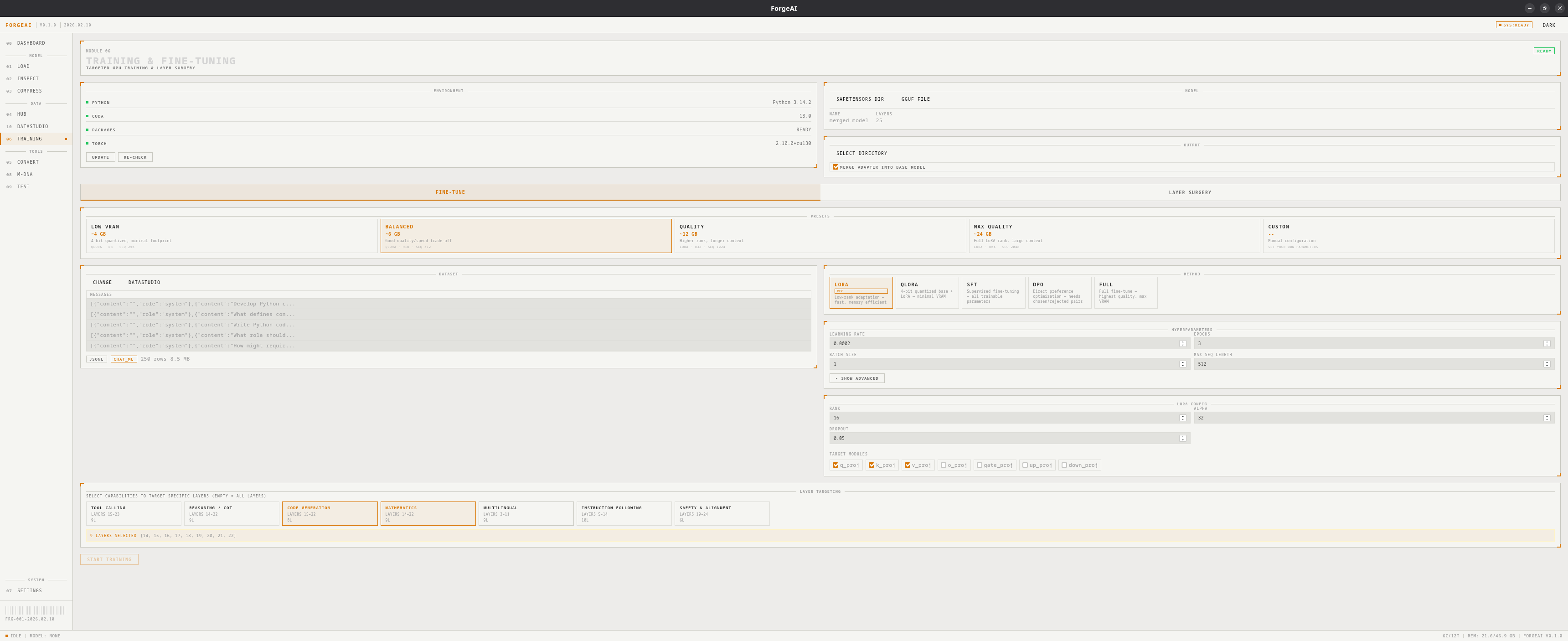 Fine-tuning requires **Python 3.10+** and a one-time environment setup. Layer surgery works immediately with no dependencies.
## Fine-Tune Mode
### Training Methods
| Method | Description | VRAM Needed |
| --------- | ------------------------------------------------------------------ | :---------: |
| **LoRA** | Low-Rank Adaptation — efficient adapter training | 6–12 GB |
| **QLoRA** | Quantized LoRA — 4-bit base model with LoRA adapters | 4–8 GB |
| **SFT** | Supervised Fine-Tuning — standard training on instruction datasets | 8–24 GB |
| **DPO** | Direct Preference Optimization — learn from chosen/rejected pairs | 8–24 GB |
| **Full** | Full parameter update — maximum quality, highest VRAM | 16–48 GB |
### VRAM Presets
**\~4 GB** — QLoRA, rank 8, 256 seq length
**\~6 GB** — QLoRA, rank 16, 512 seq length
**\~12 GB** — LoRA, rank 32, 1024 seq length
**\~24 GB** — LoRA, rank 64, 2048 seq length
### Hyperparameters
Full control over all training parameters:
| Parameter | Description |
| --------------------- | ----------------------------------------- |
| Learning Rate | Step size for gradient descent |
| Epochs | Number of full passes through the dataset |
| Batch Size | Samples per training step |
| Gradient Accumulation | Effective batch size multiplier |
| Max Sequence Length | Maximum token length per sample |
| Warmup Steps | Linear warmup steps at start |
| Weight Decay | L2 regularization strength |
| Save Steps | Checkpoint save interval |
| LoRA Rank | Rank of low-rank matrices (8–64) |
| LoRA Alpha | Scaling factor for LoRA |
| LoRA Dropout | Dropout probability on adapters |
| Quantization Bits | 4 or 8 (for QLoRA) |
| DPO Beta | KL penalty coefficient (for DPO) |
### Capability-Targeted Layer Selection
Instead of fine-tuning all layers, target specific model capabilities:
| Capability | Affected Layers | What It Trains |
| ------------------------- | :-------------: | ------------------------------ |
| **Tool Calling** | Upper-mid | API/function calling ability |
| **Reasoning / CoT** | Mid-upper | Chain-of-thought reasoning |
| **Code Generation** | Upper-mid | Code writing and understanding |
| **Mathematics** | Mid | Mathematical reasoning |
| **Multilingual** | Early-mid | Multi-language support |
| **Instruction Following** | Mid | Adherence to instructions |
| **Safety & Alignment** | Final | Safety behavior adjustment |
### Target Module Detection
ForgeAI auto-detects available LoRA target modules from the model architecture:
| Module | Component |
| ----------- | ----------------------------- |
| `q_proj` | Query projection (Attention) |
| `k_proj` | Key projection (Attention) |
| `v_proj` | Value projection (Attention) |
| `o_proj` | Output projection (Attention) |
| `gate_proj` | Gate projection (MLP) |
| `up_proj` | Up projection (MLP) |
| `down_proj` | Down projection (MLP) |
### Dataset Support
* **Auto-detection** of templates: Alpaca, ShareGPT, ChatML, DPO pairs, Text, Prompt/Completion
* **Formats**: JSON, JSONL, CSV, Parquet
* **Preview**: View dataset rows and column structure before training
### Live Training Dashboard
During training, a real-time dashboard shows:
* Epoch and step progress
* Loss value with step-by-step loss history
* Learning rate (with warmup visualization)
* GPU VRAM usage
* ETA / time remaining
* Option to merge adapter back into base model after completion
### Workflow
First time only: ForgeAI checks for Python, creates a venv, installs PyTorch + PEFT + TRL.
Browse for a GGUF or SafeTensors model (or folder).
Browse for a training dataset. ForgeAI auto-detects format and template.
Pick a training method and VRAM preset. Optionally target specific capabilities.
Click **START TRAINING** and monitor real-time progress.
***
## Layer Surgery Mode
Fine-tuning requires **Python 3.10+** and a one-time environment setup. Layer surgery works immediately with no dependencies.
## Fine-Tune Mode
### Training Methods
| Method | Description | VRAM Needed |
| --------- | ------------------------------------------------------------------ | :---------: |
| **LoRA** | Low-Rank Adaptation — efficient adapter training | 6–12 GB |
| **QLoRA** | Quantized LoRA — 4-bit base model with LoRA adapters | 4–8 GB |
| **SFT** | Supervised Fine-Tuning — standard training on instruction datasets | 8–24 GB |
| **DPO** | Direct Preference Optimization — learn from chosen/rejected pairs | 8–24 GB |
| **Full** | Full parameter update — maximum quality, highest VRAM | 16–48 GB |
### VRAM Presets
**\~4 GB** — QLoRA, rank 8, 256 seq length
**\~6 GB** — QLoRA, rank 16, 512 seq length
**\~12 GB** — LoRA, rank 32, 1024 seq length
**\~24 GB** — LoRA, rank 64, 2048 seq length
### Hyperparameters
Full control over all training parameters:
| Parameter | Description |
| --------------------- | ----------------------------------------- |
| Learning Rate | Step size for gradient descent |
| Epochs | Number of full passes through the dataset |
| Batch Size | Samples per training step |
| Gradient Accumulation | Effective batch size multiplier |
| Max Sequence Length | Maximum token length per sample |
| Warmup Steps | Linear warmup steps at start |
| Weight Decay | L2 regularization strength |
| Save Steps | Checkpoint save interval |
| LoRA Rank | Rank of low-rank matrices (8–64) |
| LoRA Alpha | Scaling factor for LoRA |
| LoRA Dropout | Dropout probability on adapters |
| Quantization Bits | 4 or 8 (for QLoRA) |
| DPO Beta | KL penalty coefficient (for DPO) |
### Capability-Targeted Layer Selection
Instead of fine-tuning all layers, target specific model capabilities:
| Capability | Affected Layers | What It Trains |
| ------------------------- | :-------------: | ------------------------------ |
| **Tool Calling** | Upper-mid | API/function calling ability |
| **Reasoning / CoT** | Mid-upper | Chain-of-thought reasoning |
| **Code Generation** | Upper-mid | Code writing and understanding |
| **Mathematics** | Mid | Mathematical reasoning |
| **Multilingual** | Early-mid | Multi-language support |
| **Instruction Following** | Mid | Adherence to instructions |
| **Safety & Alignment** | Final | Safety behavior adjustment |
### Target Module Detection
ForgeAI auto-detects available LoRA target modules from the model architecture:
| Module | Component |
| ----------- | ----------------------------- |
| `q_proj` | Query projection (Attention) |
| `k_proj` | Key projection (Attention) |
| `v_proj` | Value projection (Attention) |
| `o_proj` | Output projection (Attention) |
| `gate_proj` | Gate projection (MLP) |
| `up_proj` | Up projection (MLP) |
| `down_proj` | Down projection (MLP) |
### Dataset Support
* **Auto-detection** of templates: Alpaca, ShareGPT, ChatML, DPO pairs, Text, Prompt/Completion
* **Formats**: JSON, JSONL, CSV, Parquet
* **Preview**: View dataset rows and column structure before training
### Live Training Dashboard
During training, a real-time dashboard shows:
* Epoch and step progress
* Loss value with step-by-step loss history
* Learning rate (with warmup visualization)
* GPU VRAM usage
* ETA / time remaining
* Option to merge adapter back into base model after completion
### Workflow
First time only: ForgeAI checks for Python, creates a venv, installs PyTorch + PEFT + TRL.
Browse for a GGUF or SafeTensors model (or folder).
Browse for a training dataset. ForgeAI auto-detects format and template.
Pick a training method and VRAM preset. Optionally target specific capabilities.
Click **START TRAINING** and monitor real-time progress.
***
## Layer Surgery Mode
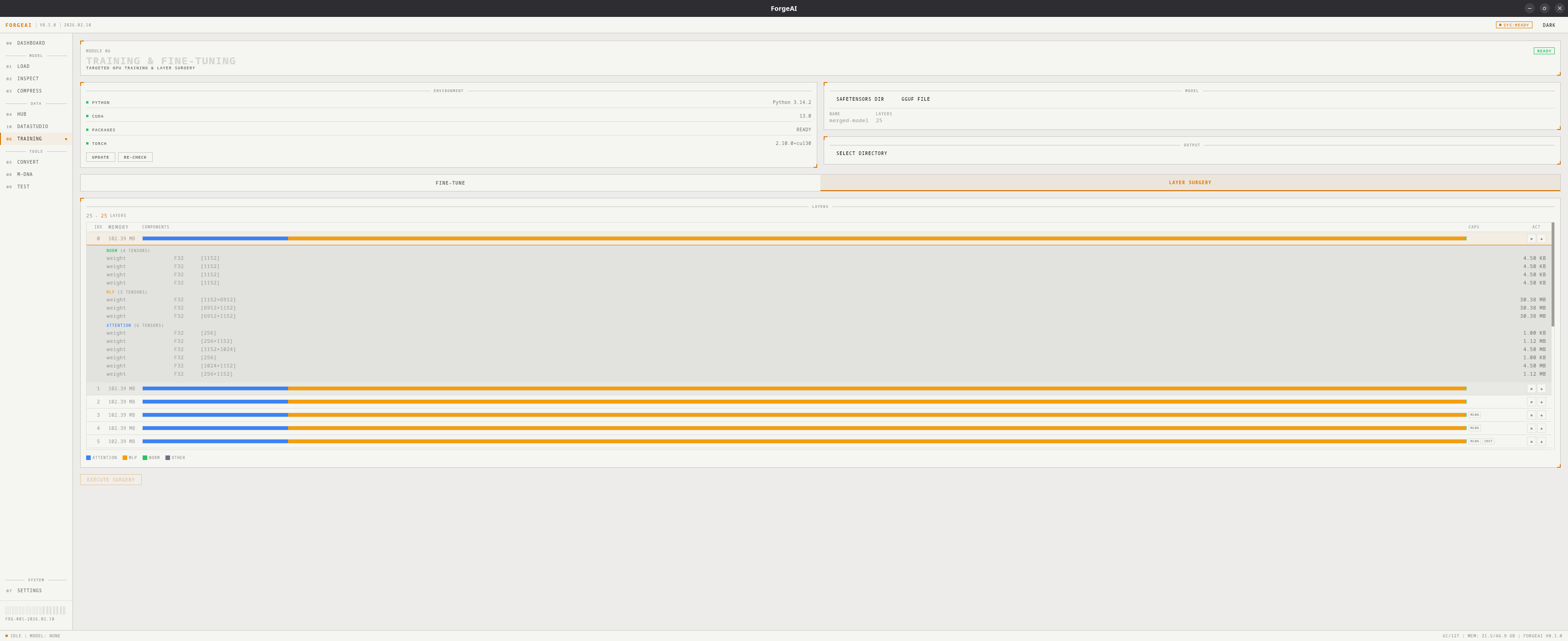 Pure Rust tensor operations — **no Python or GPU required**.
### Operations
| Operation | Description |
| -------------------- | ---------------------------------------------------- |
| **Remove Layers** | Select and strip layers to reduce model size |
| **Duplicate Layers** | Clone layers at specific positions to increase depth |
### Features
* **Rich Layer Table** — memory breakdown per layer with component bars (attention/MLP/norm %)
* **Tensor-Level Inspection** — expand any layer to see every tensor's dtype, shape, and memory
* **Surgery Preview** — shows final layer count before execution
* **Format Support** — works with both SafeTensors directories and GGUF files
* **Auto-Update** — automatically updates `config.json` / GGUF metadata with new layer counts
### Workflow
Browse for a GGUF file or SafeTensors folder
Click **LOAD LAYER DETAILS** to see all layers with tensor-level breakdown
Check layers to **remove**, or add layers to **duplicate** at specific positions
Click **RUN SURGERY**. The output is a new model file — the original is never modified.
Pure Rust tensor operations — **no Python or GPU required**.
### Operations
| Operation | Description |
| -------------------- | ---------------------------------------------------- |
| **Remove Layers** | Select and strip layers to reduce model size |
| **Duplicate Layers** | Clone layers at specific positions to increase depth |
### Features
* **Rich Layer Table** — memory breakdown per layer with component bars (attention/MLP/norm %)
* **Tensor-Level Inspection** — expand any layer to see every tensor's dtype, shape, and memory
* **Surgery Preview** — shows final layer count before execution
* **Format Support** — works with both SafeTensors directories and GGUF files
* **Auto-Update** — automatically updates `config.json` / GGUF metadata with new layer counts
### Workflow
Browse for a GGUF file or SafeTensors folder
Click **LOAD LAYER DETAILS** to see all layers with tensor-level breakdown
Check layers to **remove**, or add layers to **duplicate** at specific positions
Click **RUN SURGERY**. The output is a new model file — the original is never modified.