

Convert (05)
Convert SafeTensors models (HuggingFace format) to GGUF files compatible with llama.cpp, Ollama, LM Studio, and other GGUF-based runtimes.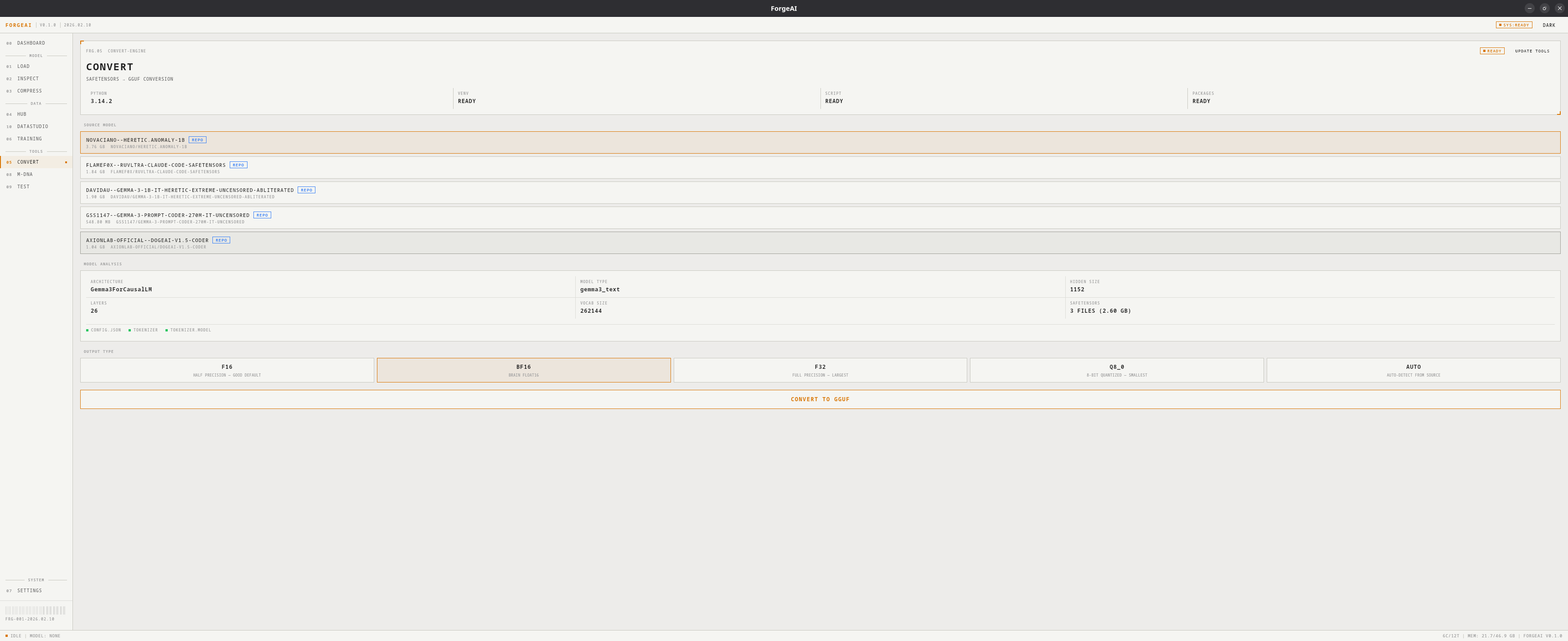
Requires Python 3.10+ and a one-time dependency setup (~500 MB). The convert environment is separate from the training environment and can be managed in Settings.
First-Time Setup
1
Detect Python
ForgeAI checks for Python 3 on launch
2
Install dependencies
Click INSTALL DEPENDENCIES — creates a virtual environment with
transformers, torch, safetensors, sentencepiece, protobuf3
GPU detection
ForgeAI detects your GPU and installs the right PyTorch variant (CUDA for NVIDIA, CPU otherwise)
Output Types
Model Analysis
After selecting a source, ForgeAI shows:
File checks verify:
config.json (required), tokenizer files, safetensors weights.
Workflow
1
Select source
Pick a SafeTensors repo from the list (downloaded via Hub) or click GO TO HUB
2
Review analysis
Check architecture, file counts, and file checks
3
Choose output type
Select F16, BF16, F32, Q8_0, or AUTO
4
Convert
Click CONVERT TO GGUF, choose output location, monitor progress
5
Result
See output path and size. Click LOAD MODEL to use immediately in ForgeAI.