
Test (09)

Run text generation on GGUF or SafeTensors models with real-time token streaming, 6 quick test presets, and full control over generation parameters. Test Module
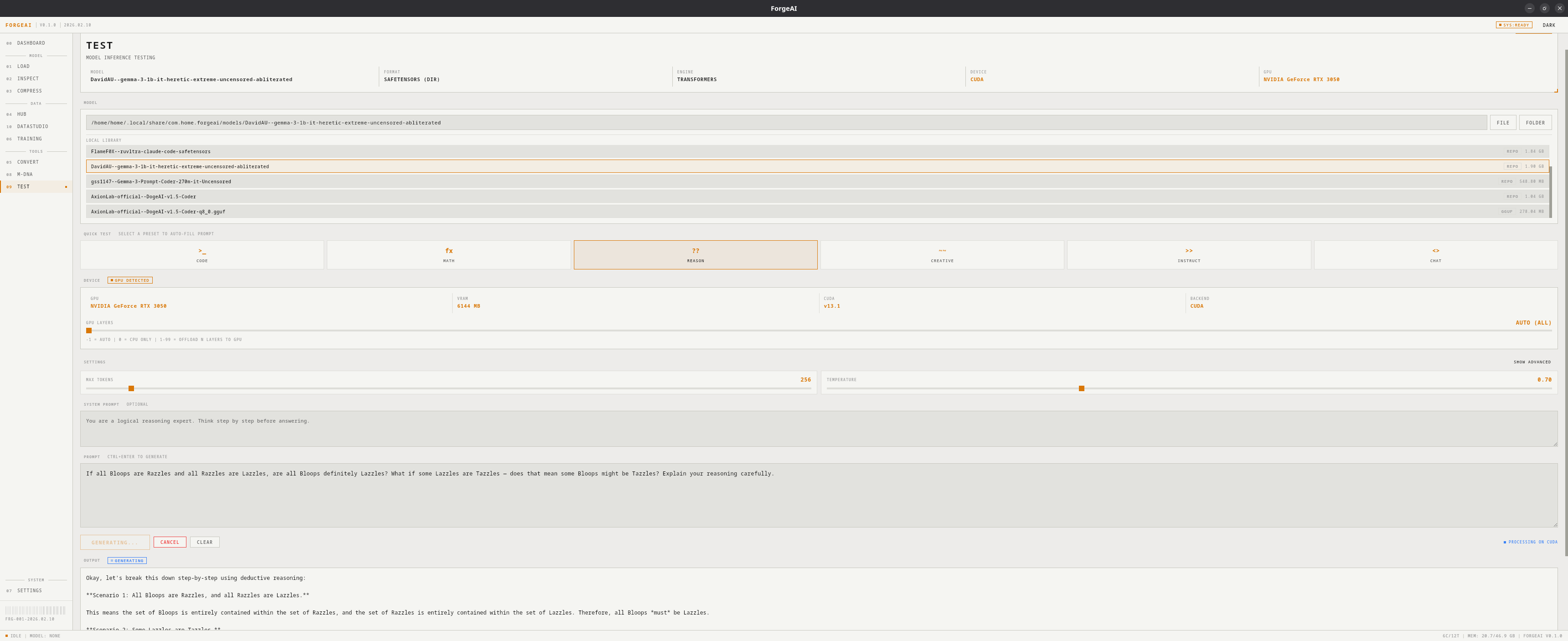
Model Selection

Manual Path

Type or paste a file/folder path

Browse

Click FILE or FOLDER to open system dialog

Use Loaded

Quick button for the currently loaded model

Local Library

Click a chip from your downloaded models
For SafeTensors models, use the folder path (containing config.json and tokenizer), not an individual .safetensors file.

Quick Test Presets

Click a preset to instantly fill in a test prompt:
PresetPrompt ThemeTests
CODEFizzBuzz in PythonCode generation ability
MATHWord problem solvingMathematical reasoning
REASONLogic puzzleLogical deduction
CREATIVEStory writingCreative writing
INSTRUCTStep-by-step tasksInstruction following
CHATConversationalGeneral chat ability

Inference Engines

FormatEngineDevice
GGUFllama.cpp (llama-cli)CPU or GPU
SafeTensorsHuggingFace TransformersGPU (CUDA) → CPU fallback

Generation Settings

ParameterRangeDefaultDescription
Max Tokens1–8192256Maximum tokens to generate
Temperature0–20.7Randomness. 0 = deterministic
Top-p0–10.9Nucleus sampling threshold
Top-k1–10040Top-k token sampling
Repeat Penalty1.0–2.01.1Repetition suppression
Context Size512–327682048Context window size
GPU Layers-1 to 99-1Layer offloading (-1=auto, 0=CPU)

System Prompt

Add a custom system message to guide model behavior (e.g., “You are a helpful coding assistant.”).

Output

Tokens stream into the output panel in real time. After completion, a stats bar shows:
StatDescription
TOKENSNumber of tokens generated
TIMETotal generation time
SPEEDTokens per second
DEVICECPU or CUDA

GPU Acceleration

  • GGUF: Uses GPU if llama.cpp was installed with CUDA or Vulkan variant. GPU layers setting controls how many layers are offloaded to GPU.
  • SafeTensors: Tries CUDA GPU first; falls back to CPU if out of memory.