M-DNA Forge (08)

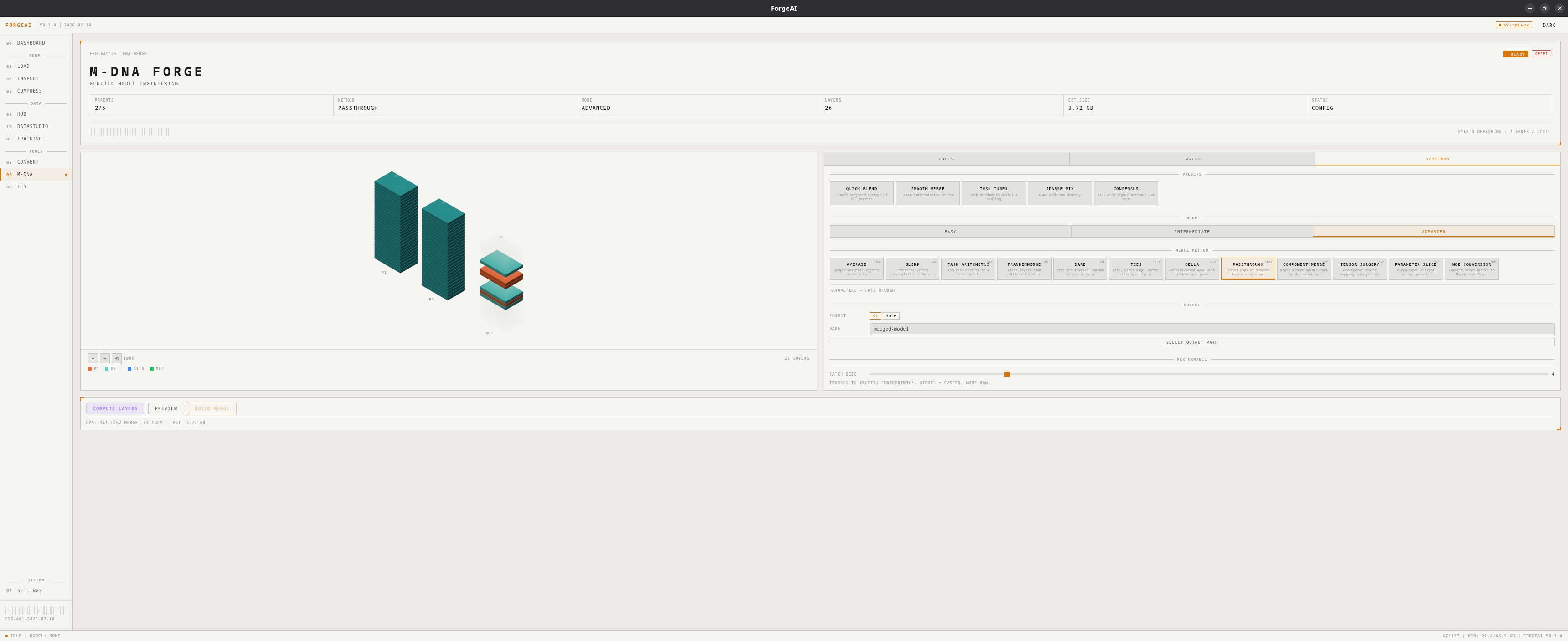
M-DNA Forge is ForgeAI’s model merging system. Load multiple parent models, choose a merge strategy, configure layer assignments, and build a hybrid offspring — with 12 merge methods, 5 quick presets, and an interactive 3D visualization. M-DNA Setup
Concepts

TermMeaning
ParentA source model contributing weights (2–5 supported)
OffspringThe resulting merged model
Base modelA reference model required by some methods (TIES, DARE, Task Arithmetic, DeLLa)
Layer assignmentWhich parent provides which layer in the offspring

12 Merge Methods

MethodDifficultyRequires BaseDescription
AverageEasyNoWeighted mean of tensors
SLERPEasyNoSpherical interpolation — best for 2-model merges
PassthroughEasyNoDirect copy from a single parent
Task ArithmeticIntermediateYesAdd task vectors from finetunes to a base
FrankenmergeIntermediateNoCherry-pick layers from specific parents
DAREIntermediateYesDrop and rescale delta parameters
TIESIntermediateYesTrim, elect sign, merge — resolve interference
DeLLaAdvancedYesDensity-based layer-level adaptive merging
Component MergeAdvancedNoRoute attention/MLP/norm to different parents
Tensor SurgeryAdvancedNoPer-tensor source mapping from any parent
Parameter SliceAdvancedNoDimensional slicing across parents
MoE ConversionAdvancedNoConvert dense models to Mixture-of-Experts

Quick Presets

M-DNA Presets Click a preset to instantly configure method and parameters:
PresetMethodKey ParamsBest For
Quick BlendAverageSimple, fast merging
Smooth MergeSLERPt = 0.5Balanced interpolation
Task TunerTask Arithmeticscaling = 1.0Adding capabilities
Sparse MixDAREdensity = 0.5Efficient delta merging
ConsensusTIEStrim = 0.2Conflict resolution

Difficulty Modes

ModeAvailable MethodsBest For
EasyAverage, SLERP, PassthroughFirst-time users
Intermediate+ Frankenmerge, Task Arithmetic, DARE, TIESMost merges
AdvancedAll 12 methodsExpert users

3D Isometric Visualization

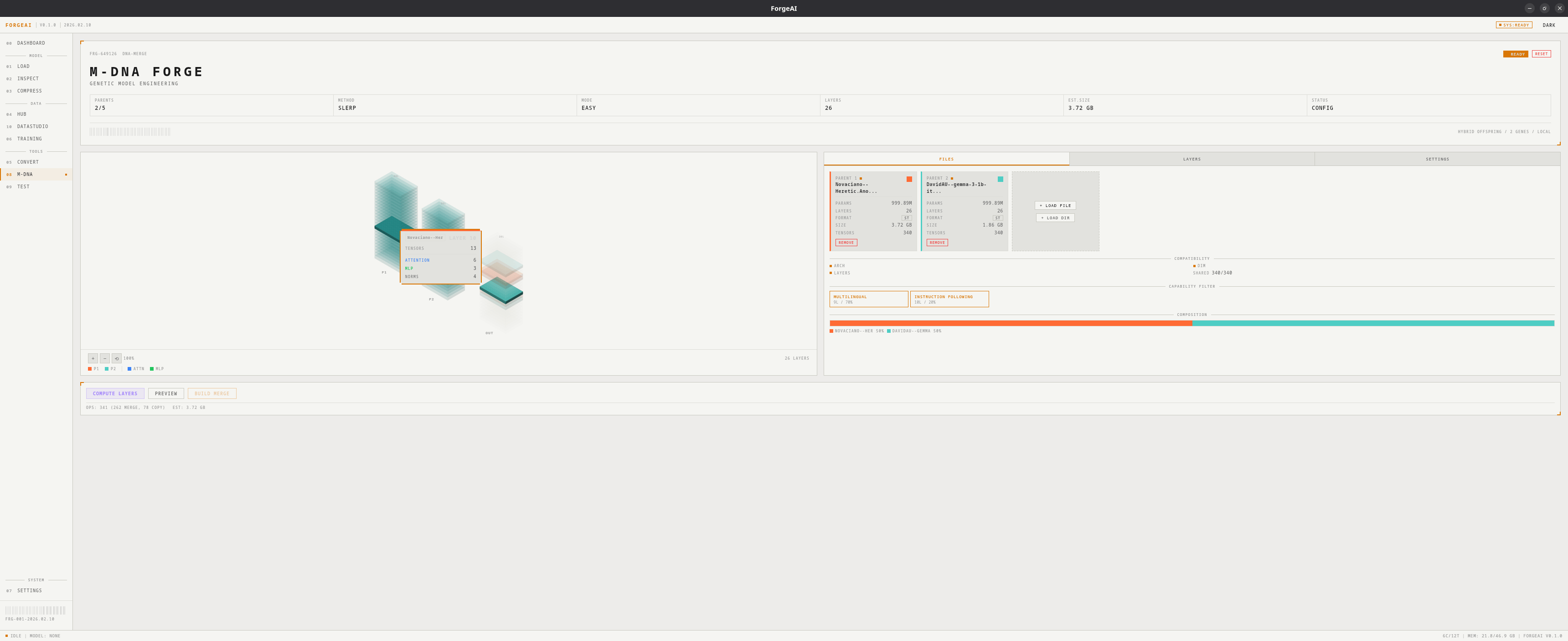
Interactive tower view showing all parent models and the resulting offspring:
  • Each layer color-coded by source parent
  • Hover for detailed tooltips
  • Pan, zoom, and reset controls

Layout

Two-column layout with 3D visualization on the left and a tabbed panel on the right:

Files Tab

  • Parent model cards (name, params, layers, format, size)
  • Load / remove parents
  • Set base model (for methods that require one)
  • Compatibility report and composition statistics

Layers Tab

  • Per-layer parent assignment (click to cycle)
  • AUTO: SPLIT — alternating parent assignment
  • AUTO: INTERLEAVE — equal chunk assignment
  • Layer analysis — specialization badges (Syntactic / Semantic / Reasoning)
  • Capability detection and filtering (7 capabilities)

Settings Tab

  • Mode selector (Easy / Intermediate / Advanced)
  • Presets section with 5 quick-apply cards
  • Method grid filtered by current mode
  • Method-specific parameter sliders
  • Output format (SafeTensors / GGUF), model name, output path
  • Batch size slider (1–16 concurrent tensors)

Performance Settings

SettingRangeDefaultDescription
Batch Size1–161Tensors processed concurrently. Higher = faster, more RAM.

Compatibility Checking

With 2+ parents loaded, ForgeAI validates:
  • Architecture match
  • Hidden dimension match
  • Layer count match
  • Shared tensor count

Cross-Dimension Merging

When parent models have different hidden dimensions (e.g., 640 vs 1152), ForgeAI can still merge them using a resolution strategy. The strategy adapts tensor shapes before the merge operation runs.
StrategyQualityDescription
InterpolationMediumResize tensors via linear/nearest-neighbor interpolation to match target shape. Default when dimensions mismatch.
Zero PaddingMediumPad smaller tensors with zeros to match the largest parent’s shape.
TruncationLowTruncate larger tensors to match the smallest parent’s shape. Loses data.
MoE RoutingHighConvert to Mixture-of-Experts — each parent becomes an expert, bypassing dimension issues entirely.
When a dimension mismatch is detected, Interpolation is auto-selected. Click any strategy in the compatibility panel to switch.

Output Formats

FormatOutput
SafeTensorsDirectory with model weights + tokenizer/config files
GGUFSingle .gguf file with embedded metadata and tokenizer

Workflow

1

Load parents

Add 2+ models via the Files tab
2

Check compatibility

Review the compatibility report
3

Choose preset or method

Click a quick preset, or manually select mode → method → parameters
4

Assign layers

For Frankenmerge: set layer assignments (or use AUTO SPLIT/INTERLEAVE)
5

Build

Click BUILD MERGE, monitor progress in sidebar and status bar
Merge runs in the background — you can navigate freely while it processes. Progress is shown in the sidebar and status bar.