

Load (01)
The Load module imports AI models into ForgeAI. It parses model headers without reading the full file, extracting metadata, tensor maps, and architecture information in under a second.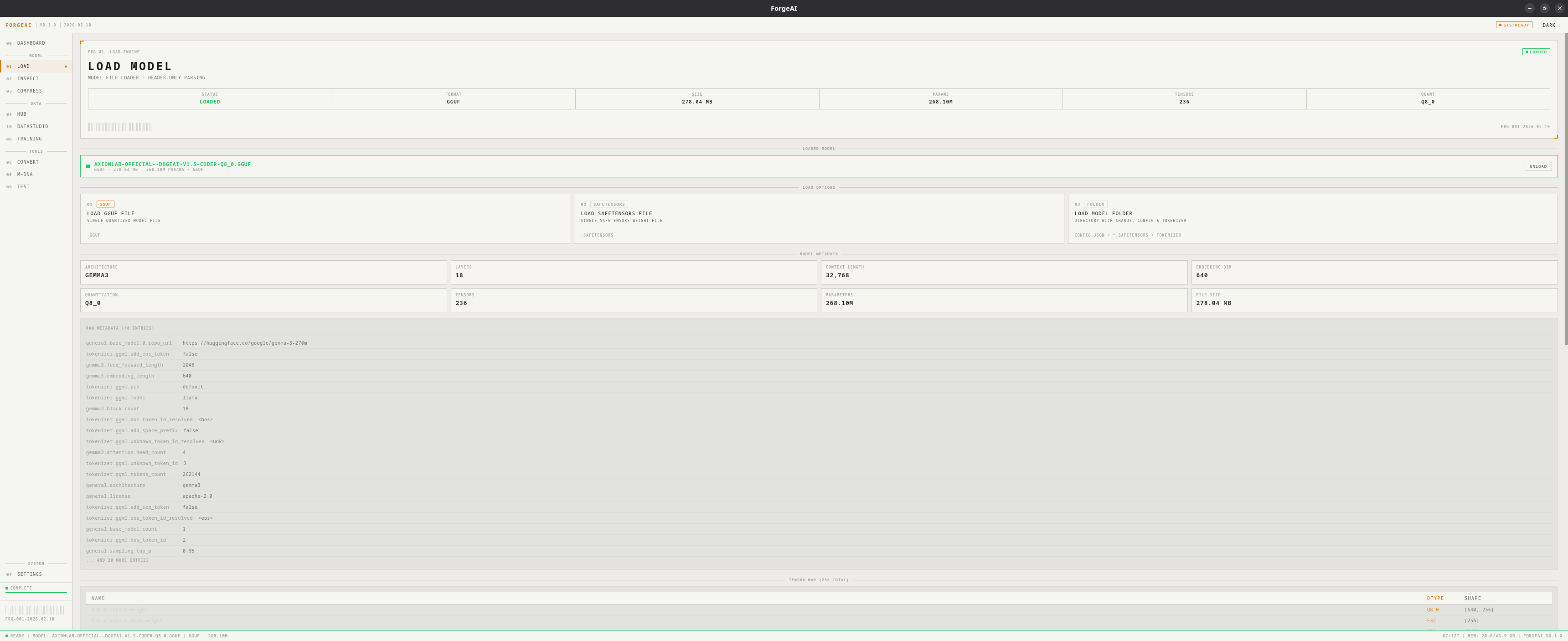
Load Options
GGUF File
Single
.gguf file — quantized models from the llama.cpp ecosystemSafeTensors File
Single
.safetensors file — HuggingFace model weightsModel Folder
Directory with
.safetensors + config.json — sharded HuggingFace modelsWhat Gets Parsed
On load, ForgeAI reads the model header and extracts:- Architecture (e.g., LlamaForCausalLM, MistralForCausalLM, Qwen2ForCausalLM)
- Layer count and context length
- Embedding dimensions
- Parameter count (computed from tensor shapes)
- Quantization type (GGUF only)
- Tensor map — names, dtypes, and shapes of all tensors
- Raw metadata — all key-value pairs from the model header
- Number of shards
- Presence of
config.json - Presence of tokenizer files
Hero Panel
Metadata Grid
After loading, a grid displays key model properties:Tensor Map Preview
A table showing tensor names, dtypes, and shapes. For large models the preview is capped with a count of remaining tensors.Raw Metadata
A scrollable list of the first 20 metadata key-value pairs from the model header.Workflow
1
Click a load button
Choose LOAD GGUF FILE, LOAD SAFETENSORS FILE, or LOAD MODEL FOLDER
2
Select file or folder
Pick your model in the system dialog
3
Review metadata
Header parsing takes under 1 second. Review model metadata, tensor map, and raw metadata.
4
Use the model
The model is now available in Inspect, Compress, Convert, Training, M-DNA, and Test modules. Click UNLOAD to clear it.