
Settings (07)

Configure appearance, detect GPU hardware, and manage all three tool environments — llama.cpp, Training, and Convert — from one place. Settings
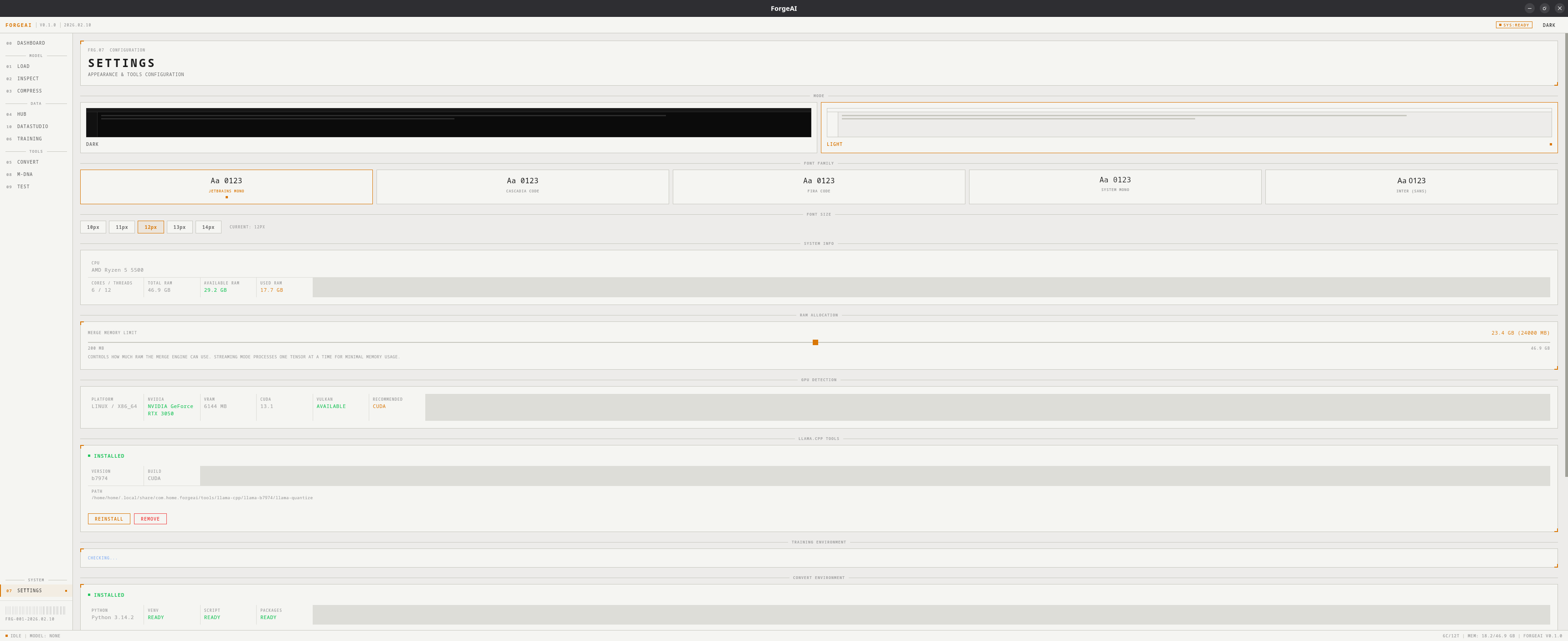
Appearance

Theme

ThemeDescription
Dark (default)Dark background (#0a0a0a) with monochrome + amber accents
LightLight background (#fafafa) variant
Click the theme toggle in the header to switch. Changes apply immediately.

Font Settings

SettingOptions
Font FamilySystem monospace fonts (JetBrains Mono preferred)
Font SizeAdjustable base font size

GPU Detection

ForgeAI auto-detects your hardware:
FieldDescription
OSOperating system
ARCHCPU architecture
NVIDIAGPU name, VRAM, CUDA version
VULKANVulkan support status
METALMetal support (macOS)
RECOMMENDEDSuggested llama.cpp variant

Environment Management

All three tool environments are managed from Settings:

llama.cpp Tools

Required for GGUF quantization (Compress) and GGUF inference (Test).
StateActions
Not installedSelect variant (CPU/CUDA/Vulkan) → DOWNLOAD & INSTALL
InstalledView version, path → REINSTALL or REMOVE

Training Environment

Python virtual environment for fine-tuning (PyTorch + PEFT + TRL + BitsAndBytes).
StateDisplay
Not installed”Install from Training page”
InstalledPython version, venv status, package list, CUDA availability
PartialMissing packages highlighted
Actions: CLEAN/DELETE to remove the environment and start fresh.

Convert Environment

Python virtual environment for SafeTensors → GGUF conversion.
StateDisplay
Not installed”Install from Convert page”
InstalledPython version, venv status, script, packages
PartialMissing packages highlighted
Actions: CLEAN/DELETE to remove the environment and start fresh.

Color Semantics

ColorRole
AmberIdle, accent, interactive elements
BlueWorking, in-progress operations
GreenSuccess, loaded, complete
RedError, failure, destructive actions
GrayPaused, disabled, inactive